



You will love this app! There are two ways to get it:
1. Log into our website montanagoodlife.com. If you are using an iPhone, it will recognize your device and prompt you to download the app.
2. Launch the App Store app on your iPhone or iPad.
Tap on the search icon in the bottom navigation.
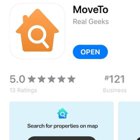
Type in Moveto and search the app that looks like the orange house icon above, and make sure the provider is Real Geeks.
Once it is on your iPhone, you can use it just as you have been using our website to customize your search.
Still having problems? Contact us!